
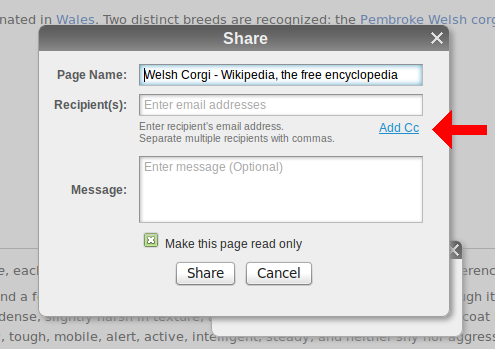
We recently changed the way email sharing works based on our own internal experience using scrible for article sharing. We got frustrated that we couldn’t have group email threads based on articles we were sharing with each other. The way things were working, if you shared an article with multiple people, each recipient would receive their own Share Email. Then, if one of the recipients wanted to reply to that email and include all of the other recipients, they’d have to somehow magically know who those recipients were and manually add those people to his (or her) reply. Ugh. We didn’t like that. After grumbling about it to each other for a while, we remembered that we write the code and fixed it! Now, all of the email addresses you enter into the Recipients field in the Share Window will all be sent one group email so that every person will see all of the other folks included in the Share Email. So now, to carry on a group email conversation about the article, all you have to do is hit “Reply All” and everyone’s in the loop! Much better!
We’re always looking for ways to improve sharing. If you have suggestions on how to make scrible more collaborative, please let us know through our feedback page.



 For those of you who missed scrible at CES (we don’t blame you, there were TVs there bigger than our booth!) may not have noticed that we now have an iPad optimized version of the toolbar and library. There’s no app to install, just a bookmarklet like the desktop version. All you have to do is point your web browser to scrible, and we’ll take care of the rest.